
Complete Guide Overview
This guide is the deep version. If your goal is not just "make one puzzle," but "make good puzzles repeatedly," this is for you.
What I Learned After Making 200+ Puzzles
Before I wrote this guide, I spent months creating puzzles for different audiences—kids in my daughter's class, team-building events at work, and weekend challenges for puzzle-loving friends. The biggest lesson: a beautiful photo does not automatically make a fun puzzle. I once used a stunning sunset shot that looked amazing as a wallpaper but was nearly impossible to solve because 60% of the image was a smooth orange gradient. That failure taught me to think about "puzzle readability" before aesthetics, and it shaped every recommendation in this guide.
If you want a fast first success in about 5 minutes, use the quick article first: Turn Any Photo into a Jigsaw Puzzle Online in 5 Minutes.
What you will get from this guide
By the end, you will know how to:
- Pick photos that are fun to solve, not just pretty to look at
- Choose piece counts based on audience, time, and device
- Test puzzle quality before sharing
- Run online + printable workflows from the same source image
- Build a repeatable process you can reuse for classes, events, and teams
Phase 1: Define your puzzle goal before you upload
Most frustrating puzzles fail before upload. Set these three inputs first:
- Audience: kids, family, casual adults, advanced players
- Session length: 10 min, 30 min, 60+ min
- Use case: solo play, group challenge, classroom, gift, printable
This avoids the common mismatch: beautiful photo + wrong difficulty.
Phase 2: Choose and prepare the right image
Use the 3-check quality test
Before upload, confirm:
- Subject clarity: main subject is recognizable at a glance
- Texture spread: details exist across the frame, not only one corner
- Color separation: multiple regions with visible transitions
Need examples? See Best Photo Types for Jigsaw Puzzles.
Pre-upload image prep (2-4 minutes)
Keep edits light and practical:
- Crop out empty backgrounds
- Straighten horizon if needed
- Increase brightness slightly for dark images
- Add a small contrast bump if the image looks flat
Avoid heavy filters. They often reduce useful texture.
Device-aware image decisions
- Phone-first audience: stronger contrast, clearer subject boundaries
- Desktop audience: can handle denser texture and higher piece counts
- Mixed devices: prioritize readability over artistic subtlety
Phase 3: Build the puzzle in Jigsawify
Open Create a Jigsaw Puzzle and upload your image.
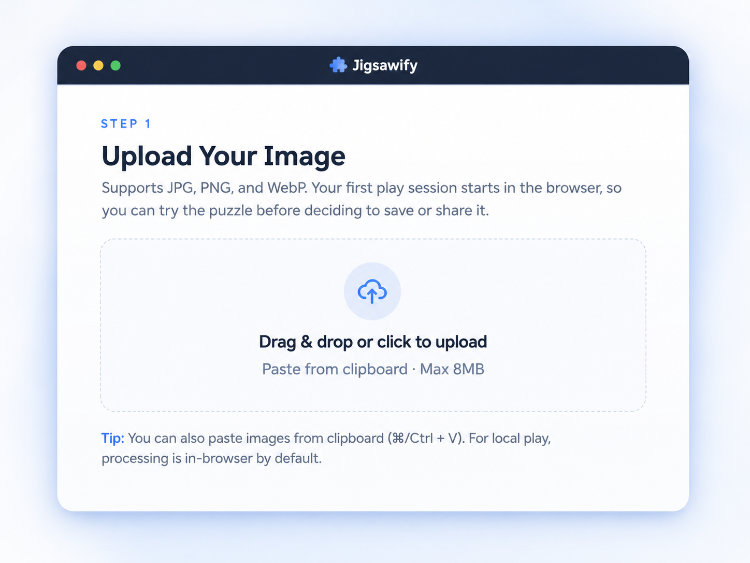
Then use this structured sequence:
- Upload photo
- Choose baseline piece count
- Generate puzzle
- Test early solve experience
- Adjust once if needed
When you set the piece count, Jigsawify shows a recommended grid and lets you fine-tune anywhere from 4 to 1,000 pieces before you open the puzzle.
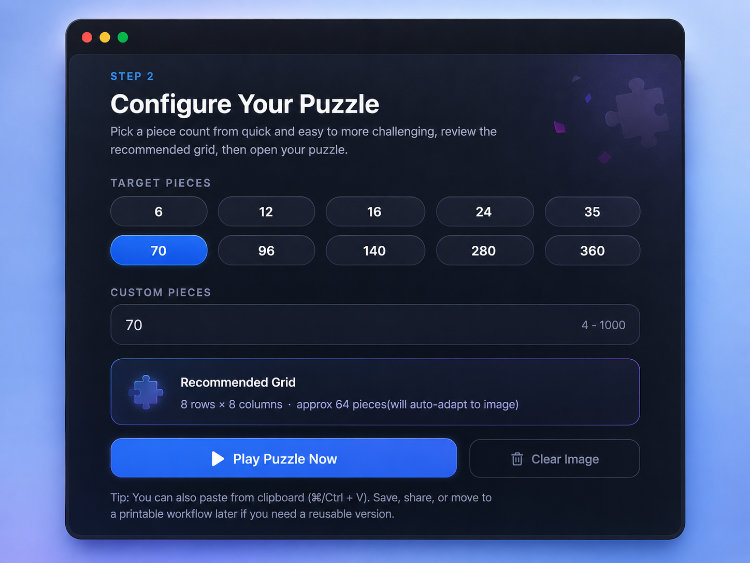
Do not over-tune in many small steps. One clean adjustment is usually enough.
Phase 4: Choose piece count with intent
Baseline piece-count matrix
| Audience / intent | Suggested pieces | Typical duration |
|---|---|---|
| Kids / warm-up | 9-35 | 5-15 min |
| Casual social play | 70-140 | 15-40 min |
| Focused solo challenge | 180-320 | 35-75 min |
| Advanced session | 280-1000 | 60+ min |
Adjust by content complexity
- Busy image (many distinct details): can support higher piece count
- Flat image (large smooth areas): reduce piece count
- First shared puzzle: keep difficulty conservative
Adjust by device
- Phone: often best around 70-140
- Tablet: 140-280 works well
- Desktop: can comfortably go 280+
For advanced experimentation, try alternate shape behavior in Puzzle Generator.
Phase 5: Run a quick quality gate before sharing
Once the puzzle opens, you play directly in the browser with the pieces scattered around the board. This is where you confirm the image actually works as a puzzle.
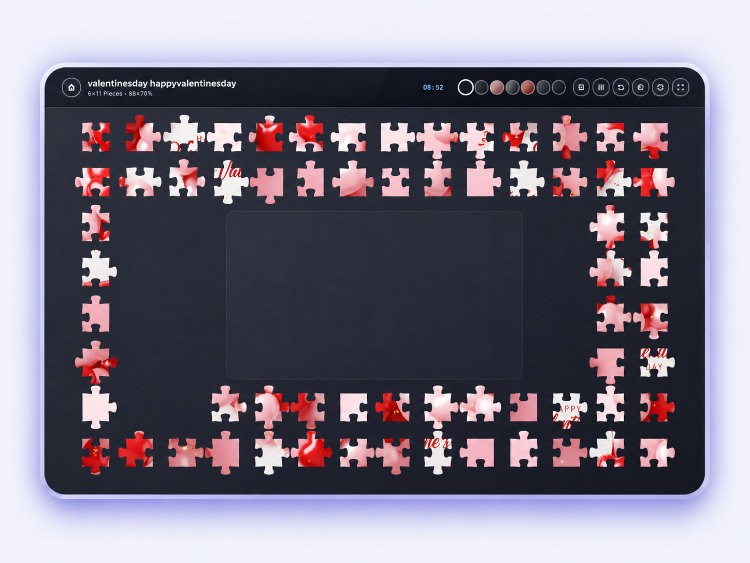
Use this 5-point pass/fail check:
- Subject visible without aggressive zoom
- Edge and corner regions have enough variation
- At least one high-contrast region for early momentum
- Piece count matches intended session length
- You can place several pieces in a short test
If 1-2 points fail, adjust once and retest.
Phase 6: Share for completion, not just clicks
When you finish a test solve, Jigsawify shows a completion summary with your time and piece count, plus a Save & Share action that generates the link you send out.
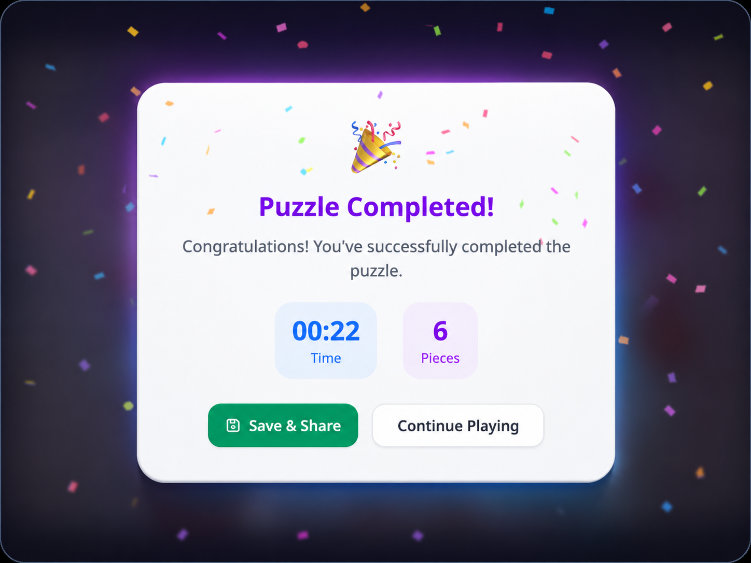
A shared puzzle performs better when expectations are clear. Include context with your link:
- Name of puzzle
- Piece count
- Expected completion time
- Optional rule (for example: ghost image after minute 8)
Reusable share template
- Puzzle: "Sunset Harbor"
- Difficulty: 120 pieces
- Target: under 22 minutes
- Rule: hint overlay allowed after 10 minutes
This simple framing increases participation and finish rate.
Phase 7: Online + printable workflow
If you need both digital play and physical output:
- Validate online first in Create a Jigsaw Puzzle
- Lock crop and difficulty
- Export via Printable Jigsaw Puzzle
- Use print settings from Printable Jigsaw Puzzle Prep
Why this order works: it prevents wasting print materials on poorly tuned puzzles.
Phase 8: Build a reusable puzzle library
When you have a working image, create three versions:
- Easy: 24-35 pieces
- Standard: 90-140 pieces
- Challenge: 180-320 pieces
Store each link with notes: target audience, typical completion time, and where people tended to stall. Over time this becomes your own reference set, and choosing settings for the next puzzle stops being guesswork.
When something feels off
A few problems come up again and again. Here is what is usually behind them:
| Problem | Likely cause | Fast fix |
|---|---|---|
| "Everything looks the same" | Low contrast or too many pieces | Reduce pieces, increase contrast, recrop |
| "Too easy" | Piece count too low | Increase pieces or pick a denser-texture image |
| "People quit halfway" | Difficulty mismatch for the audience | Lower the starting count and give a target time |
| "The printable result feels off" | Printed without testing online first | Validate online, then export |
The thread running through all of these is the same lesson from my own 200+ puzzles: the image and the piece count have to match the person solving it. Get that right before sharing, and most other problems never appear.


