Introduction
Whether you're preparing for competitive puzzle solving, wanting to complete more puzzles in limited time, or simply seeking the satisfaction of improvement, learning efficient solving techniques makes a significant difference. Expert puzzlers complete puzzles dramatically faster than beginners using systematic approaches anyone can learn. This guide shares proven strategies to improve your solving speed.
Foundation: The Right Setup
Workspace Preparation
Before touching a piece, optimize your environment:
Lighting: Bright, even lighting eliminates shadows that hide color variations. Natural daylight works best; otherwise, position multiple light sources to minimize shadows.
Surface Area: You need space beyond the puzzle frame itself. A surface 1.5 to 2 times the puzzle's finished size allows comfortable sorting and staging areas.
Height and Comfort: Choose a surface height that doesn't require hunching. Standing at a counter or sitting at a properly-sized table both work—straining doesn't.
Reference Image: Keep the puzzle box lid or a printed image visible throughout solving. Frequent reference prevents wrong assumptions about colors and positions.
Mental Preparation
Clear Time Block: Fragmented solving wastes time re-orienting each session. When possible, allocate focused blocks rather than many short sessions.
Patience Mindset: Paradoxically, accepting that solving takes time helps you solve faster. Rushing creates mistakes requiring correction, while steady progress accumulates efficiently.
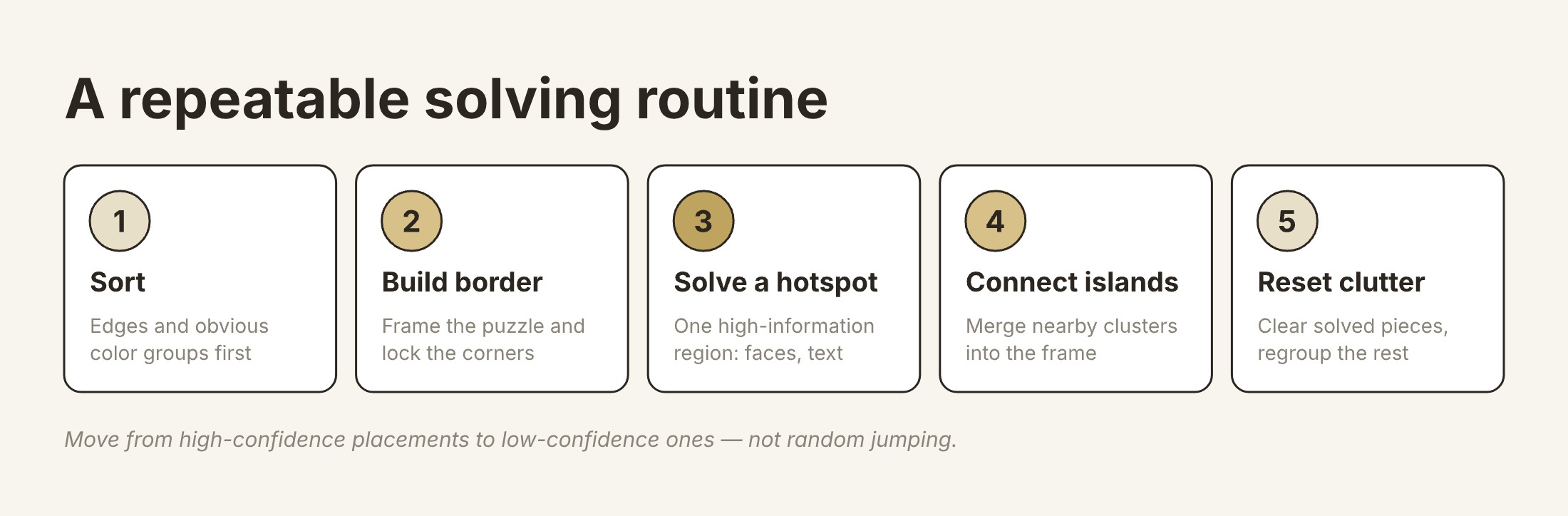
Phase 1: Strategic Sorting
The Edge Advantage
Always start by finding all edge pieces. They're identifiable by their flat sides and create the puzzle frame that anchors everything else.
Speed tip: Don't try to build the edge while sorting. First, gather all edge pieces. Then, construct the frame. Combining tasks slows both.
Color Sorting
Separate remaining pieces into color groups:
- Sky/water blues
- Vegetation greens
- Skin tones/warm colors
- Distinctive elements (red objects, etc.)
- "Difficult" pieces (low contrast, similar colors)
Speed tip: Rough sorting beats perfect sorting. You'll refine as you work—don't invest time in precise categories upfront.
Shape Sorting
Some solvers additionally sort by piece shape:
- Tabs (pieces with outward knobs)
- Blanks (pieces with inward receptacles)
- Combination patterns
Speed tip: Shape sorting helps most with single-color sections where color doesn't differentiate. For colorful puzzles, color sorting usually matters more.
Phase 2: Frame Construction
Build the Border First
Assemble the edge pieces into the complete frame before working interior sections. The frame:
- Provides definite correct placement
- Defines the working area
- Creates four corner anchors
- Offers psychological completion milestone
Corner Identification
Corners have two flat sides. Identify all four corners immediately—they're your most certain starting points.
Working Along Edges
After placing corners, work along each edge:
- Match colors and patterns visible in reference image
- Use the frame's straight edge as constant confirmation
- Connect from corners toward center of each edge
Speed tip: Some edges are easier than others (more color variation, distinctive elements). Start with the easiest edge to build momentum.
Phase 3: Interior Strategy
High-Contrast Sections First
After completing the frame, identify the puzzle's most distinctive sections:
- Faces and figures
- Text or signage
- Bright, unusual colors
- Clear pattern boundaries
Complete these sections first. Each completed section:
- Removes pieces from remaining pool
- Creates new edges to build from
- Provides psychological encouragement
The "Island" Approach
Don't feel obligated to connect every placed piece immediately. Building disconnected "islands" of completed sections is efficient. Islands eventually connect as surrounding areas fill in.
Speed tip: Position islands roughly where they'll ultimately connect. This prevents confusion about their final placement.
Working from Known to Unknown
Always expand from completed areas into adjacent incomplete spaces. This approach:
- Provides edge pieces to match against
- Uses more complete reference information
- Creates clear progress direction
Random picking from remaining pieces wastes time. Systematic expansion from known areas is faster.
Advanced Techniques
Pattern Recognition Development
Expert puzzlers develop subconscious pattern recognition:
Piece shape memory: Knowing you need a specific shape dramatically narrows search space. Practice noticing shapes, not just colors.
Color gradient awareness: Understanding how colors transition across images helps predict piece positions before trying them.
Image detail recall: Study the reference image thoroughly. Knowing what details exist where prevents searching entire piles for pieces you'd recognize with better image knowledge.
Two-Handed Technique
Speed puzzlers use both hands:
- One hand holds/positions pieces
- Other hand searches for next piece
- While placing one piece, other hand prepares the next
This parallel processing significantly increases pieces-per-minute rates.
The "Constant Search" Method
Rather than: find piece → place piece → find next piece
Try: place piece while already scanning for next piece
The hand placing doesn't need eyes. While it completes motor movement, eyes can already search for the subsequent piece.
Edge-Piece Counting
Before starting, count pieces per edge. Divide total piece count by columns/rows shown in reference image. This tells you expected pieces per edge, helping identify when edge is complete.
Common Mistakes That Slow You Down
Forcing Fits
The most time-consuming mistake: trying to make incorrect pieces fit. If a piece requires force, it's wrong. Backing out and trying alternatives beats forcing then fixing.
Ignoring the Reference
Puzzlers often rely on memory rather than checking the reference image. Memory isn't as accurate as you think. Glance at the reference frequently—it's there to help.
Perfectionism in Sorting
Over-detailed initial sorting wastes more time than it saves. Rough categories get refined naturally as you work. Perfect organization isn't the goal; completion is.
Neglecting Difficult Sections
It's natural to avoid low-contrast sections where progress feels slow. But avoiding them makes them harder—you have fewer adjacent completed areas to work from. Address difficult sections before remaining pieces become overwhelming.
Session Fragmentation
Many short sessions require warm-up time each session: re-orienting, rebuilding mental models, finding where you stopped. Fewer longer sessions are more efficient than many brief ones.
Speed Training Exercises
Timed Practice
Set timers for puzzle sessions and track your times. Measurement alone improves performance—you'll naturally find efficiencies when watching the clock.
Single-Section Focus
Practice on just puzzle sections (edge, one color area) to develop specific skills without full puzzle time investment.
Difficulty Progression
Start timing with easier puzzles, then gradually increase piece counts. Building speed at accessible levels creates foundation for harder challenges.
Shape-Only Practice
Try solving sections by shape alone (covering the image). This develops piece-shape recognition that complements color matching.
Digital Puzzle Specific Tips
Use Zoom Functions
Digital puzzles allow zooming for detail. Use this to identify subtle color variations impossible to see at full zoom-out.
Leverage Sorting Features
Many digital puzzle platforms offer automatic edge sorting, color sorting, or grouping. Use these features—they're faster than manual sorting.
Rotate Previews
Digital pieces can usually be rotated before placement. Use rotation previews to test fits without committing.
Screen Real Estate
Use the largest comfortable screen available. More visible pieces at once means less scrolling and faster pattern recognition.
Competitive Solving Tips
Practice Under Pressure
If competing, practice with stress: timers, observers, unfamiliar puzzles. Competition conditions differ from casual solving.
Study Common Puzzle Styles
Competitive puzzles often use certain image types. Familiarize yourself with common categories to build relevant pattern recognition.
Physical Conditioning
Extended solving strains hands, back, and eyes. Stretching, proper posture, and eye breaks improve sustained performance.
Mental Stamina
Competitive solving requires extended focus. Practice long sessions to build mental endurance alongside technical skills.
Conclusion
Faster puzzle solving combines systematic approaches with developed intuition. The techniques in this guide—strategic sorting, edge-first construction, working from known to unknown, and avoiding common mistakes—provide the systematic foundation. Pattern recognition and piece-handling speed develop through practice.
Remember that speed should enhance enjoyment, not replace it. A solved puzzle in stressed frustration provides less satisfaction than one completed in focused calm, even if slower. Use these techniques to find your optimal balance of efficiency and enjoyment.
Start with one or two techniques from this guide, incorporate them into your solving routine, and add additional strategies as earlier ones become automatic. Your solving speed will steadily improve, and the satisfaction of efficient progress compounds the pleasure puzzles already provide.