
A Quick Note from the Builder
I built Jigsawify because I kept running into the same problem: I had photos on my phone that I wanted to turn into puzzles for my family, but every tool I found either required a download, charged upfront, or buried the actual puzzle behind five setup screens. So I made something where you just drop a photo and play. This 5-minute guide is the exact workflow I use when I want to send a quick puzzle challenge to friends on a Saturday morning.
5-Minute Quick Start
If you want a puzzle you can play right now, this is the shortest path. No deep setup, no overthinking, just photo -> upload -> piece count -> play.
Start here: Create a Jigsaw Puzzle
Who this is for
- First-time users
- Family or classroom warm-ups
- Anyone who wants a shareable puzzle in one sitting
If you need advanced controls, printable workflow planning, or repeatable quality checks, jump to the full guide: How to Make Your Own Jigsaw Puzzle Online.
The 5-minute workflow
| Time | What to do | Goal |
|---|---|---|
| 0:00-1:00 | Pick one clear photo | Avoid frustrating puzzle texture |
| 1:00-1:30 | Upload in Create Puzzle | Get to playable state fast |
| 1:30-2:30 | Choose piece count | Match difficulty to your player |
| 2:30-4:00 | Do a short test solve | Confirm readability and fun |
| 4:00-5:00 | Share link | Start a challenge immediately |
Step 1: Pick a photo in 60 seconds
Use this quick filter:
- Clear subject (person, pet, landmark, object)
- Visible color changes across the image
- Some texture in multiple areas (not one flat wall or sky)
Avoid these for quick-start puzzles:
- Very dark photos
- Blurry photos
- Large single-color backgrounds
If you are unsure between two images, pick the one with stronger contrast. It usually solves better.
Need a deeper image selection framework? See: Best Photo Types for Jigsaw Puzzles.
Step 2: Upload and create immediately
Open Create a Jigsaw Puzzle, then:
- Drag and drop your photo (or paste from clipboard)
- Wait for preview
- Move directly to piece count
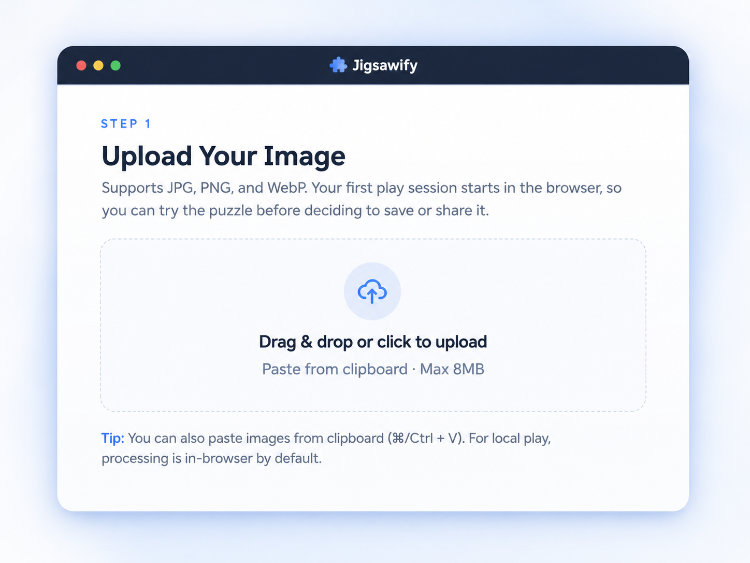
For a quick-start flow, avoid heavy edits before upload. Test first, then refine only if needed.
Step 3: Choose piece count fast
Use this simple rule:
- 9-35 pieces: easy / kids / very short sessions
- 70-140 pieces: best default for most users
- 280+ pieces: long challenge
If this is your first shared puzzle, stay in the 70-120 range. It gives challenge without high drop-off.
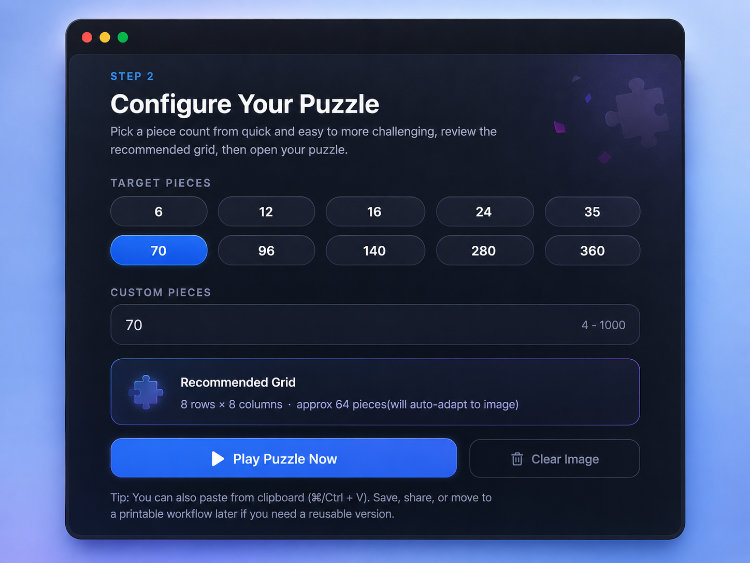
You can tune difficulty later with Puzzle Generator if you want different piece behavior.
Step 4: Do a 90-second test solve
Before sharing, place a few pieces quickly:
- Find one corner or edge line
- Place 2-3 high-contrast pieces
- Check if sections are distinguishable at normal zoom
If you can place several pieces without frustration, the puzzle is ready.
If it feels messy:
- Lower piece count once
- Re-crop slightly tighter around the subject
- Increase contrast a little and retry
Step 5: Share with a clear challenge prompt
Instead of sending only a raw link, send context:
- Puzzle: "City Night Market"
- Pieces: 90
- Target time: 18 minutes
- Rule: ghost image after 8 minutes
This improves completion because players know what to expect.
If the puzzle does not feel right
After your test solve, two problems are common, and both are quick to fix:
- Too hard or "everything looks the same" — reduce the piece count by 20-40%, or swap to a brighter photo with clearer object edges. Low contrast is the usual culprit, not the piece count alone.
- Too easy — increase the count, or pick a scene with repeated texture (trees, a crowd, textiles). You can also try a different piece style in the Puzzle Generator.
If people keep stopping halfway, it is almost always difficulty mismatch: lower the starting count and give them a target time so the finish line feels reachable.
Want printable output too?
You can keep this quick workflow and still print later. Use Printable Jigsaw Puzzle after your online test is done — validating on screen first means you never waste paper on a puzzle that turns out to be unsolvable. For paper, DPI, and sizing details, read Printable Jigsaw Puzzle Prep.
When you need a deeper, repeatable process for classes, events, or teams, continue with the full guide: How to Make Your Own Jigsaw Puzzle Online.


